
Before you upgrade
Make sure you have
- Your ReaderPen Secure
- A micro-USB cable
- A computer (MAC, Windows or Linux)
Check
- Current ReaderPen Secure software version
Go to Settings/System Information/Version and check Software version
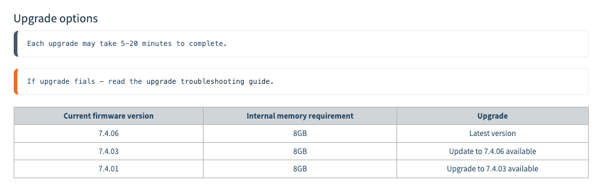
Upgrade to 7.4.06
Current version MUST be 7.4.01 or higher
Download: 7.4.06 upgrade file
- Unzip the downloaded file.
- Power up ReasderPen Secureand connect it by USB to your computer.
- Use nav-buttons and select U-Disk. Press OK button to confirm.
- Locate your unzipped upgrade file on your computer and copy updatesys_7.4.03.BIN to your ReaderPen Secure.
- Eject ReaderPen Secure disk from your computer and detach the USB cable.
- On LingoPen, navigate to Settings/Software upgrade.
- Press OK button to select and use nav button to select YES and press OK button again.
Upgrade to 7.4.03
Current version MUST be 7.4.01
Download: 7.4.03 upgrade file
- Unzip the downloaded file.
- Power up ReasderPen Secureand connect it by USB to your computer.
- Use nav-buttons and select U-Disk. Press OK button to confirm.
- Locate your unzipped upgrade file on your computer and copy updatesys_7.4.03.BIN to your ReaderPen Secure.
- Eject ReaderPen Secure disk from your computer and detach the USB cable.
- On LingoPen, navigate to Settings/Software upgrade.
- Press OK button to select and use nav button to select YES and press OK button again.